Getting Started
Welcome to the ASME Help Center which contains articles for administrators on how to use the OpenWater platform to run their programs. OpenWater is a platform that organizations use to manage application and review workflows such as awards, abstracts, grants, scholarships, etc.
ASME primarily uses OpenWater to run the abstracts and review for their annual conferences.
This help center will focus on the most common conference workflow that ASME follows, which is a typical 4-round process (though in some cases a 3-round process) that covers the following items:
1. Collection of short abstracts
2. OFAC signatures collected if required.
3. Sessions are created and assembled
4. Draft papers are submitted and peer reviewed
5. Revised draft papers are submitted if required
6. Copyright signatures collected if required
7. Full papers are submitted.
8. Sessions are scheduled on a calendar
The following sections cover high level items that will be referenced throughout this help center.
Sandbox Environment
Before making any serious changes to a conference setup or making use of a new feature, it may be advisable to first experiment with the functionality in the ASME sandbox system.
It is safe to make mistakes and setup samples and test programs here without harming your production environment.
Here are the relevant links for the sandbox system:
Admin Panel: https://asme-sandbox.secure-platform.com/a/admin
Public Portal: https://asme-sandbox.secure-platform.com/a
Extender App: https://asmeextensionsandbox.azurewebsites.net/admin/programs
If you need access to the sandbox, you can contact your primary ASME administrator.
Production Environment
The production environment has a unique url for each conference that is run, but it is easiest if you just use the ASME Turbo Expo url to login. If you need access to this environment, you should contact the primary ASME administrator.
Admin Panel: https://asme-turboexpo.secure-platform.com/a/admin/
Public Portal: https://asme-turboexpo.secure-platform.com/a
Extender App: https://asmeextension.azurewebsites.net/admin/programs
Single Sign On
The ASME IT team has built a single sign on with their membership management panel. This allows your submitters and reviewers to login to the OpenWater portal with the same login credentials that they use on your own ASME website. Sometimes a user has trouble logging in — you should inquire with your ASME IT team if this occurs. The below animation demonstrates what happens when a user tries to login to OpenWater and gets redirected to ASME login.

OFAC
OFAC is the “Office of Foreign Asset Control” and governs sanctions that the United States has on certain countries from participating in conferences. The list of countries regularly changes and needs to be updated by OpenWater developers. You can put in a support ticket if this list needs to be updated.
If a user is listed as an author and their country of origin is from an OFAC sanctioned nation, the submission will be automatically flagged for OFAC signature.
The affected author will receive an email from a system that OpenWater integrates with called AlphaTrust. AlphaTrust is a signature collection software that ASME has purchased and manages.
The author must sign the OFAC statement and it must be accepted by ASME staff in order for the paper to be eligible for peer review.
Copyright
Draft papers that are accepted by peer review and are eligible for Full Paper Submission must have all participating authors sign a copyright agreement that is sent to them automatically by the AlphaTrust signature system. All copyright agreements must be received in order for the authors to submit the Full Paper.
This can be turned off on a per program basis.
iThenticate
Draft papers, revised draft papers, and full papers are all automatically sent to a system ASME has purchased called iThenticate that checks the paper for plagiarism. This generates a score for the paper and is populated into the submission that only a reviewer can see.
Extender App
Throughout this process, we will often reference the “Extender App”. While most of the activity happens in the core OpenWater system, there are a few key parts of the workflow that will happen in the extender app and that will be noted as such. The extender app is a custom module that OpenWater developers built for ASME. It is responsible for the Session Organizer screens and custom integrations between other systems (AlphaTrust, Single Sign On, iThenticate, etc.).
Support
OpenWater has a general help center that is useful for typical usage here: https://help.getopenwater.com/en/. Therefore, this help center will focus mostly on ASME-specific usage.
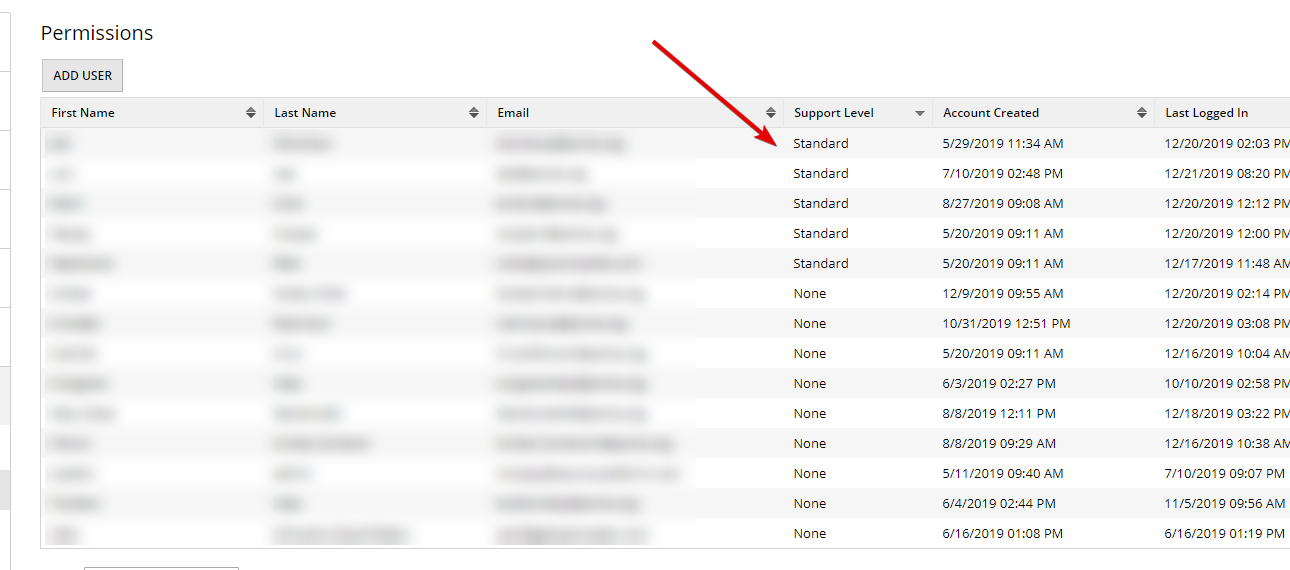
ASME has several administrator seats allocated for direct support from OpenWater support staff. These are known as the “Supported Administrators” and you can learn more about how to contact support if you are one of these individuals here: https://help.getopenwater.com/en/articles/1298364-openwater-support
Supported Administrators are designated as such in the Permissions tab in OpenWater as ‘Standard’ in the support level column here: